
DeluxeMenus showcase menu
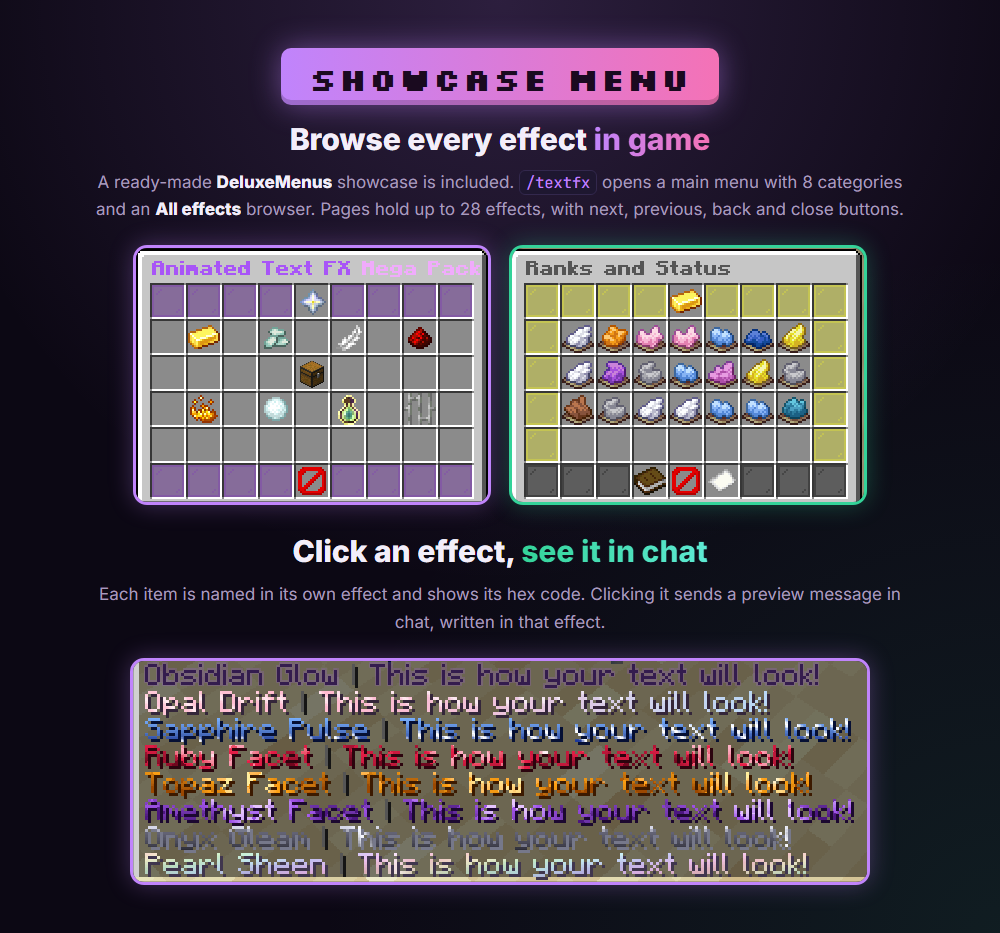
Vol. 3, the Halloween Edition, the Christmas Edition and the Mega Pack include a ready-made DeluxeMenus GUI that shows every effect, each item named in its own effect color with the hex code in the lore. Clicking an effect sends a preview message in chat written in that effect. It needs the DeluxeMenus plugin and Minecraft 1.16 or newer. Vol. 1 and Vol. 2 do not include a menu.
Dropping the file in the folder is not enough. DeluxeMenus only loads menus registered in its config.yml.
Vol. 3, Halloween and Christmas (one menu file)#
- Copy the menu file into
plugins/DeluxeMenus/gui_menus/. It isvol3-showcase-menu.ymlfor Vol. 3,halloween-showcase-menu.ymlfor Halloween andchristmas-showcase-menu.ymlfor Christmas. - Register it under
gui_menusinplugins/DeluxeMenus/config.yml, for example for Vol. 3:
gui_menus:
  animated_text_fx_vol3:
    file: vol3-showcase-menu.yml
The name on the left is your choice as long as it is unique. file: must match the file name exactly, including .yml. Use spaces, never tabs. Then run /dm reload. Default commands: /textfx3, /halloweenfx, /christmasfx.
Mega Pack (16 menu files)#
Copy every textfx_*.yml file into plugins/DeluxeMenus/gui_menus/ and register all 16 menus. The names on the left are used by the buttons to open each other, so do not rename them.
gui_menus:
  textfx_main:
    file: textfx_main.yml
  textfx_ranks_1:
    file: textfx_ranks_1.yml
  textfx_gradients_1:
    file: textfx_gradients_1.yml
  textfx_motion_1:
    file: textfx_motion_1.yml
  textfx_tech_1:
    file: textfx_tech_1.yml
  textfx_elemental_1:
    file: textfx_elemental_1.yml
  textfx_seasonal_1:
    file: textfx_seasonal_1.yml
  textfx_seasonal_2:
    file: textfx_seasonal_2.yml
  textfx_game_1:
    file: textfx_game_1.yml
  textfx_prison_1:
    file: textfx_prison_1.yml
  textfx_all_1:
    file: textfx_all_1.yml
  textfx_all_2:
    file: textfx_all_2.yml
  textfx_all_3:
    file: textfx_all_3.yml
  textfx_all_4:
    file: textfx_all_4.yml
  textfx_all_5:
    file: textfx_all_5.yml
  textfx_all_6:
    file: textfx_all_6.yml
If you already have menus, keep them and add these below with the same indentation. Run /dm reload, then open the showcase with /textfx (or /dm open textfx_main). The main menu has 8 category buttons plus an All effects browser. Pages hold up to 28 effects, with Previous page, Back to categories, Close, page number and Next page buttons on the bottom row.
Customizing the menu#
- Command name: in
textfx_main.ymlchangeopen_command: textfx, then/dm reload. - Titles, icons and positions: edit
menu_title,material:orslot:in any file. Slots count from 0 (top left) to 53 (bottom right). - Using an effect color elsewhere in DeluxeMenus: write it as
&#RRGGBB, for exampleȜC00Ruby Facet. - Do not change the hex code in an effect's
display_nameor message. The effect only plays when the color is exact.